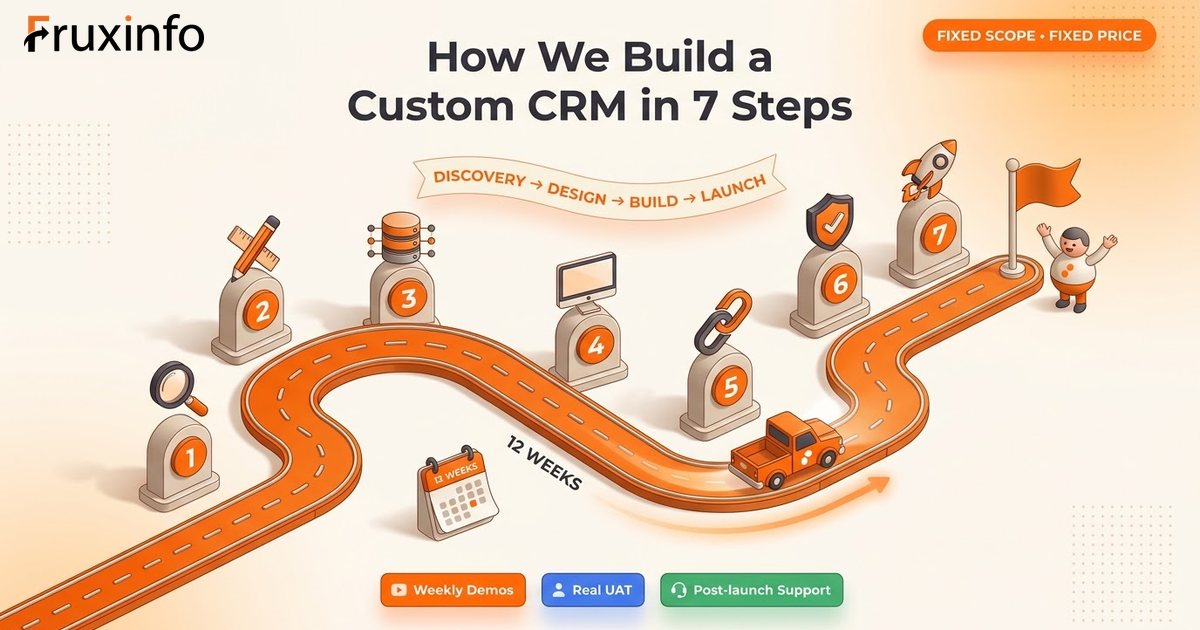
How to Build a Custom CRM: The 7-Step Process We Actually Use
23-07-2026
"How is a custom CRM actually built?" is a fair question. Most blog posts either hand-wave through it ("first we plan, then we code!") or dive into engineering jargon that does not help you make a buying decision.
This one walks through the seven steps we actually follow at Fruxinfo when building a custom CRM for a Gujarat business — what happens in each step, how long it takes, what the customer does, what the team does, and where projects most often go wrong.
Read this if you are about to buy a custom CRM, or if you are a founder / product manager thinking about building one internally. You will finish knowing exactly what you are getting into.
Step 1: Discovery (Week 1–2)
Every CRM starts with a discovery phase, even if the customer is impatient. Skipping discovery is the single biggest reason CRM projects fail — because the team builds what they think the customer needs, not what the customer actually needs.
What happens:
- Two to four calls with the founder / MD to understand the business.
- Two to five calls with each department (sales, accounts, dispatch, admin) to understand day-to-day flow.
- Whiteboard sessions to map the current pipeline — every stage, every hand-off, every stuck point.
- List every field the team currently uses (Excel, ledger, Zoho, WhatsApp — wherever).
- List every integration required.
- List every report the MD wants to see.
What the customer does: Attends 4 to 8 hours of calls. Sends samples of current Excel / reports / paper forms. Introduces the team to the development team.
Output: A written Scope Document. Every module, every field, every integration, every report. This becomes the contract. Anything not in the Scope Document is a Change Request.
Step 2: Wireframes and design (Week 2–4)
Now that we know what to build, we design what it will look like. This is where 30 percent of the project's success is decided — a well-designed CRM gets used; a poorly designed one gets abandoned within a month.
What happens:
- Low-fidelity wireframes for every screen — layout, structure, no colors yet.
- High-fidelity designs with brand colors, spacing, typography, iconography.
- Prototype (clickable Figma) so the customer can "use" the CRM before we code a line.
- Design review with the customer — 2 to 3 rounds of revisions.
What the customer does: Reviews wireframes and designs. Gives clear, decisive feedback. Involves at least one end-user (a salesperson, not just the MD) in the review — they catch things the MD does not.
Output: Approved designs for every screen. No more design changes after this signoff without a Change Request.
Step 3: Backend and database (Week 3–8)
Starts in parallel with design. The database is the CRM's memory — get it wrong and every future feature fights you.
What happens:
- Database schema — tables, relationships, indexes.
- Authentication and user management — login, roles, permissions.
- API layer — the language the frontend will speak to fetch and save data.
- Business logic — assignment rules, workflow triggers, validation.
- File storage setup — for attachments, samples, drawings, documents.
What the customer does: Mostly nothing visible. Confirms specific decisions when asked (e.g., "How many days should a lead sit before it auto-reassigns?"). Provides test data.
Output: A working backend that any authorised user or app can talk to via API. Not yet a CRM anyone can use, but the foundation.
Step 4: Frontend development (Week 4–10)
This is where the CRM starts looking like a CRM. Every designed screen gets built into a real, clickable, working page.
What happens:
- Screens coded to match approved designs — pixel-accurate.
- Every form connected to the backend.
- Every table has search, filter, sort, pagination, export.
- Every action (create, edit, delete, assign, comment) works end-to-end.
- Responsive design — the same CRM works on mobile browsers.
What the customer does: Starts seeing weekly demos — a screen or two per week going live in a test environment. Gives feedback while it is easy to change.
Output: A CRM that a user can log into, click around, add data, and see it saved.
Step 5: Integrations (Week 8–12)
The CRM does not live alone. It has to talk to Tally, WhatsApp, IndiaMART, courier APIs, payment gateways, and whatever else the business already uses. Each integration is its own mini-project.
What happens:
- Tally / Busy integration for invoices and ledger sync.
- WhatsApp Business API for automated messages and chat logging.
- IndiaMART / Justdial for auto lead capture.
- Payment gateway for online receipts.
- Courier / logistics API for dispatch tracking.
- Any custom integration with an existing ERP or in-house tool.
What the customer does: Provides API keys, credentials, test accounts. Sometimes has to buy WhatsApp Business API access or IndiaMART lead access — the customer pays these subscriptions, not the developer.
Output: A CRM connected to the customer's existing tool stack. Data flows automatically.
Step 6: Testing and UAT (Week 10–14)
Everyone thinks testing is finding bugs. Testing is really about proving the CRM does what the customer expects, in the sequence a real user will follow.
What happens:
- Internal QA — the development team runs through every module systematically.
- Bug tracking — every issue logged, fixed, verified.
- UAT (User Acceptance Testing) — the customer's team uses the CRM with real (or realistic) data.
- Two rounds of UAT feedback and fixes.
- Performance testing — how fast does the CRM load with 10,000 records, 100,000 records?
- Security check — authentication, authorization, common vulnerabilities.
What the customer does: Assigns 2 to 5 real end-users to spend 4 to 10 hours in UAT. Logs every issue in the shared bug tracker. Signs off when done.
Output: A stable CRM ready for real use.
Step 7: Launch, training, iterate (Week 14 onward)
Go-live is not "we handed it over and left". It is a supervised transition — the CRM replaces (or joins) the existing way of working, and the team needs support for the first few weeks.
What happens:
- Data migration — customer's existing leads, contacts, deals, invoices imported from Excel / Zoho / whatever.
- Production deployment — hosting, domain, SSL, backups, monitoring set up.
- Training — role-wise sessions (salesperson training, manager training, admin training). Usually 4 to 10 hours total, in 1–2 hour sessions.
- Go-live — team starts using the CRM. Developer team stays on standby for the first 2 weeks.
- Post-launch bug window — first 2 to 4 weeks of usage will reveal small issues. These get fixed under warranty.
- Iteration — after 4–8 weeks of use, the customer will have a Phase 2 wishlist. Prioritise, quote, build.
What the customer does: Attends training. Actually starts using the CRM. Reports issues promptly. Champions the CRM internally — the MD saying "we all use the CRM from Monday" is the difference between adoption and abandonment.
Output: A live CRM being used by the team every day.
Typical timeline (mid-scope build)
| Week | Milestone | What is happening |
|---|---|---|
| Week 1–2 | Discovery | Interviews, scoping, sign-off on Scope Document |
| Week 2–4 | Design | Wireframes, designs, prototype signed off |
| Week 3–8 | Backend | Database, API, roles, business logic (parallel with design/frontend) |
| Week 4–10 | Frontend | Every screen coded, forms live, weekly demos to customer |
| Week 8–12 | Integrations | Tally, WhatsApp, IndiaMART, whatever the scope needs |
| Week 10–14 | Testing / UAT | Internal QA, customer UAT, bug fixing, performance and security check |
| Week 14+ | Launch | Data import, training, go-live, post-launch support |
Faster projects (MVP scope): 4 to 8 weeks. Bigger projects (native mobile, complex integrations, multi-region): 4 to 9 months. Enterprise CRMs run 9 to 18 months with phased releases.
Where CRM projects most often go wrong
1. Discovery gets rushed
The customer is impatient, the developer wants to start coding, discovery gets a two-hour call instead of two weeks. Six months later, half the CRM is unused because it does not match the business.
2. Design gets skipped
"Just build something, we will make it look nice later." Later never comes. Ugly CRMs get abandoned. Invest in design at the start, not as a bolt-on.
3. Scope keeps expanding mid-build
Every week a new "small feature" gets slipped in without formal Change Request. Timeline slips, budget balloons, the team gets frustrated. Discipline: everything after Scope Document sign-off is a formal CR.
4. No end-users in UAT
Only the MD tests. MDs miss what a daily user catches. Real end-users must UAT — a salesperson trying to add a lead in 30 seconds finds problems the MD's careful walkthrough would never surface.
5. No training investment
Team gets a login and a "figure it out" — most will retreat to Excel by week 3. Real training, role-wise, in short sessions, is what makes adoption stick.
6. No maintenance plan
Go-live is the halfway point, not the finish line. The CRM will need small changes every month — a report tweak, a new field, a bug in edge case. Budget for a maintenance retainer (₹8k–₹40k/month) or accept that changes will be slow and expensive as one-offs.
What good CRM vendors do differently
- Insist on real discovery, even when the customer pushes to skip it.
- Show weekly progress, not just at milestones.
- Bring an actual designer to the project, not just developers.
- Write everything in a Scope Document up front.
- Handle change requests formally (quote → approve → build).
- Involve real end-users in UAT.
- Provide role-wise training, not a single mass session.
- Stay engaged after go-live, not disappear.
Ask potential vendors for their process. If they cannot describe it in this level of detail, they do not have one — and your project will feel like it.
How Fruxinfo runs the process
We follow the seven steps above, timed for mid-scope Gujarat CRM builds — 8 to 16 weeks total. Fixed scope, fixed price, weekly demos, real discovery, real design, real training. Post-launch we stay on a maintenance retainer if you want it, or drop back to hourly if you prefer.
If you are planning a custom CRM and want to see how the process would look for your specific business, tell us about it. We come back with a scope, timeline, and price within two working days.
Also read: custom CRM development for the kind of CRMs we build, and CRM development in Ahmedabad for local context.
The bottom line
Building a custom CRM is not a coding exercise. It is a business-understanding exercise that happens to include coding. Discovery, design, build, integrate, test, launch, iterate — seven steps, done in that order, done properly. Skip any step and the project either fails or gets rebuilt in a year.
The good news: done right, a custom CRM lasts five to ten years and outperforms every off-the-shelf option for the business it was built for. That is why the process matters more than the technology stack.
Related Services
Want to put these ideas into practice? Talk to Fruxinfo Ahmedabad about: